Pro & Power Tools
Build and sell a custom gift set
Bundle 2 to 8 products into a gift-ready set, turn it into a listing draft, and publish it to TikTok Shop or Etsy. Printonic assembles, boxes, and ships every order for you. Selling one of our ready-made sets instead needs no builder and no Pro.
Gift sets let you sell a curated bundle (say, a candle plus a mug plus a soap bar) as one product with one price. You pick the items, Printonic handles the box, the assembly, and the shipping when it sells.
There are two ways to get one on your store. If you want to sell a set Printonic has already put together, you do not need the builder or a subscription: those sets sit in the Catalog next to the single products, and you list one exactly like any other product (Catalog > the set > Add to My Products, then the usual wizard). See the FAQ at the bottom for the short version.
The rest of this guide covers the other way: inventing your own combination in the Custom Gift Set Builder, which is a Printonic Pro feature. That flow has two parts: first you build the set itself, then you turn it into a listing you can publish to your store.
- 1
Dashboard > My Gift Sets
Open My Gift Sets
In the dashboard sidebar, click My Gift Sets. The page has two tabs, My Current Sets and Create New Gift Set, plus badges at the top showing the current limits (max items and max weight in ounces). There is also a short video, See how Gift Sets work, if you would rather watch first.
This is a Pro feature. If you are not subscribed, the page shows an upgrade prompt instead (with a free trial where eligible), and the sidebar item shows a lock.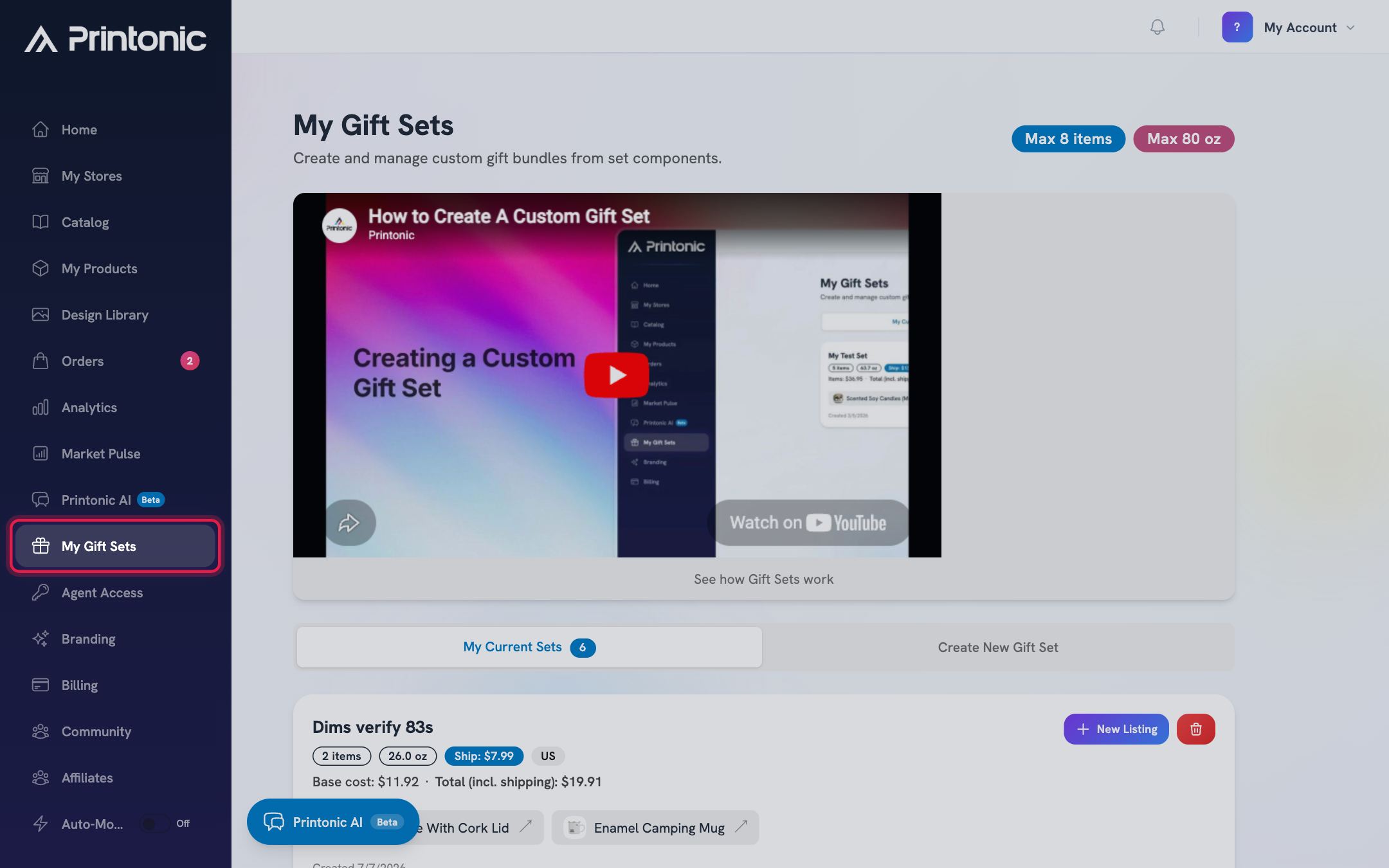
- 2
Dashboard > My Gift Sets > Create New Gift Set
Start a new set with a name and destination
On the Create New Gift Set tab, enter a Gift Set Name (for example, Holiday Gift Bundle) and pick a Destination Country. The country is used to estimate shipping for the set; United States is the default.
If you try to create without a name you will see: Please enter a name for your gift set.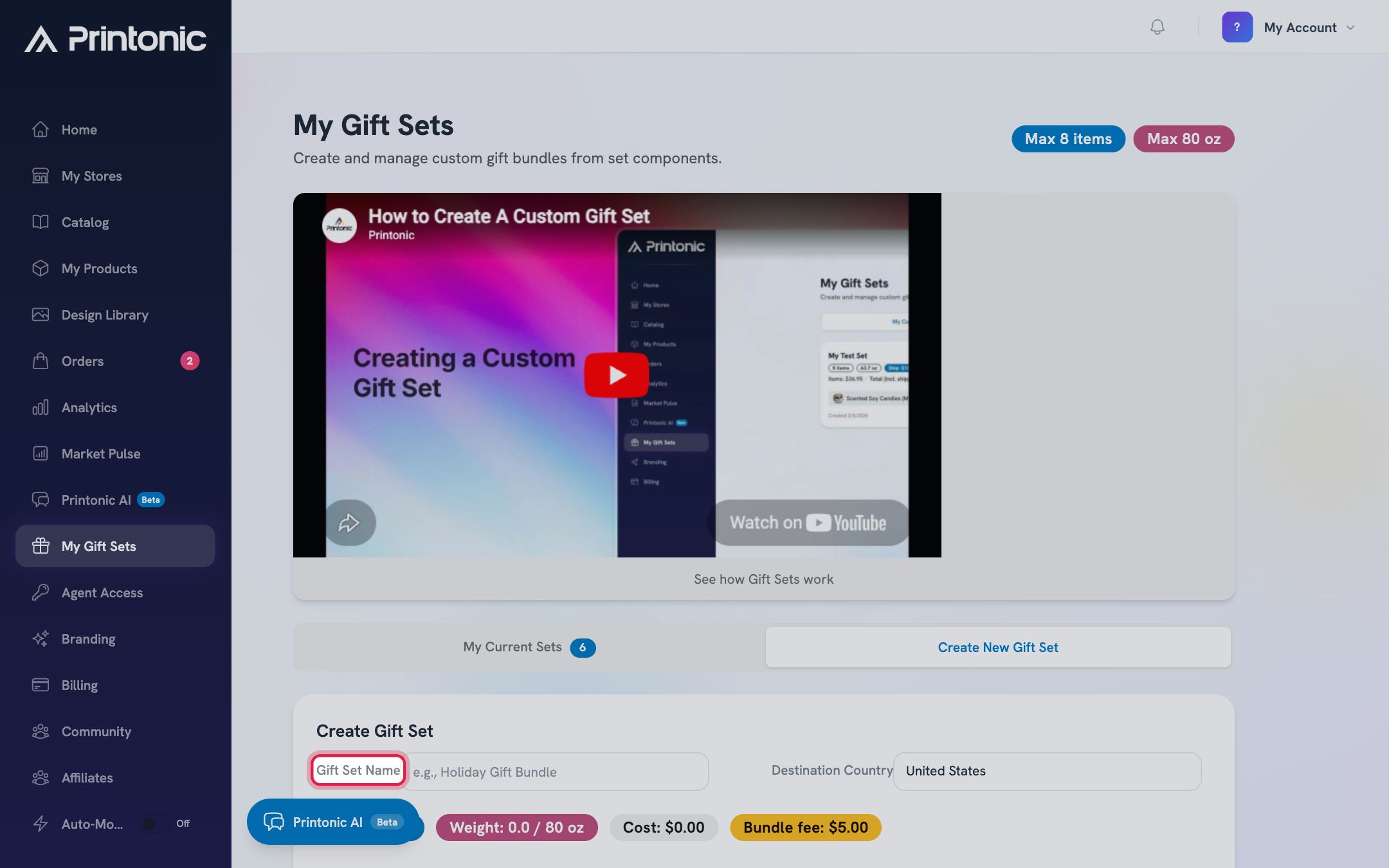
- 3
Dashboard > My Gift Sets > Create New Gift Set
Add 2 to 8 products to the bundle
Under Add Products, use the Search eligible products box and click an item to add it. Each card shows the product's cost and weight, and the eye icon opens a larger photo with its available options. As you add items, the Items, Weight, and Cost badges update live.
Only gift-set eligible catalog products appear here. If you go over the item or weight limit, the badge turns red and the Create Gift Set button stays disabled until you are back under.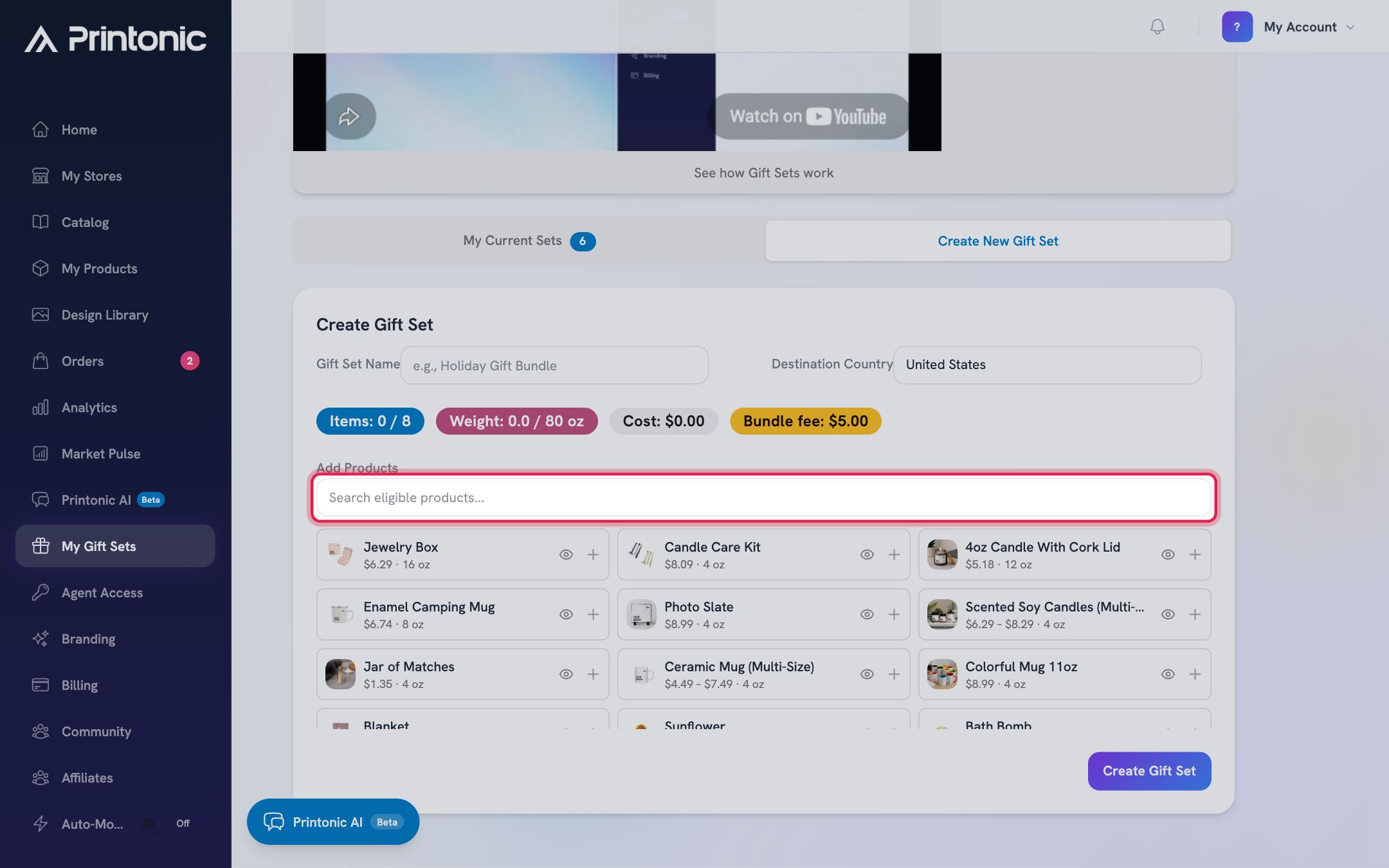
- 4
Dashboard > My Gift Sets > Create New Gift Set
Pick options for products that come in choices
Clicking a product that has options (like scent or color) opens a picker asking you to select which options to include in the gift set. Use the All and None buttons per option group, or toggle individual options, then click Add to Gift Set. To change your picks later, click the product again and use Update Options.
Below the choices, the Etsy listing preview shows the two dropdowns buyers will see and how many combinations that makes. Etsy allows two choice dropdowns per listing; if your set exposes more, use Split into separate listings to create one set per option of the dimension you pin. Leaving a whole group unchecked excludes that choice from the set entirely. You must keep at least one option selected to add the product.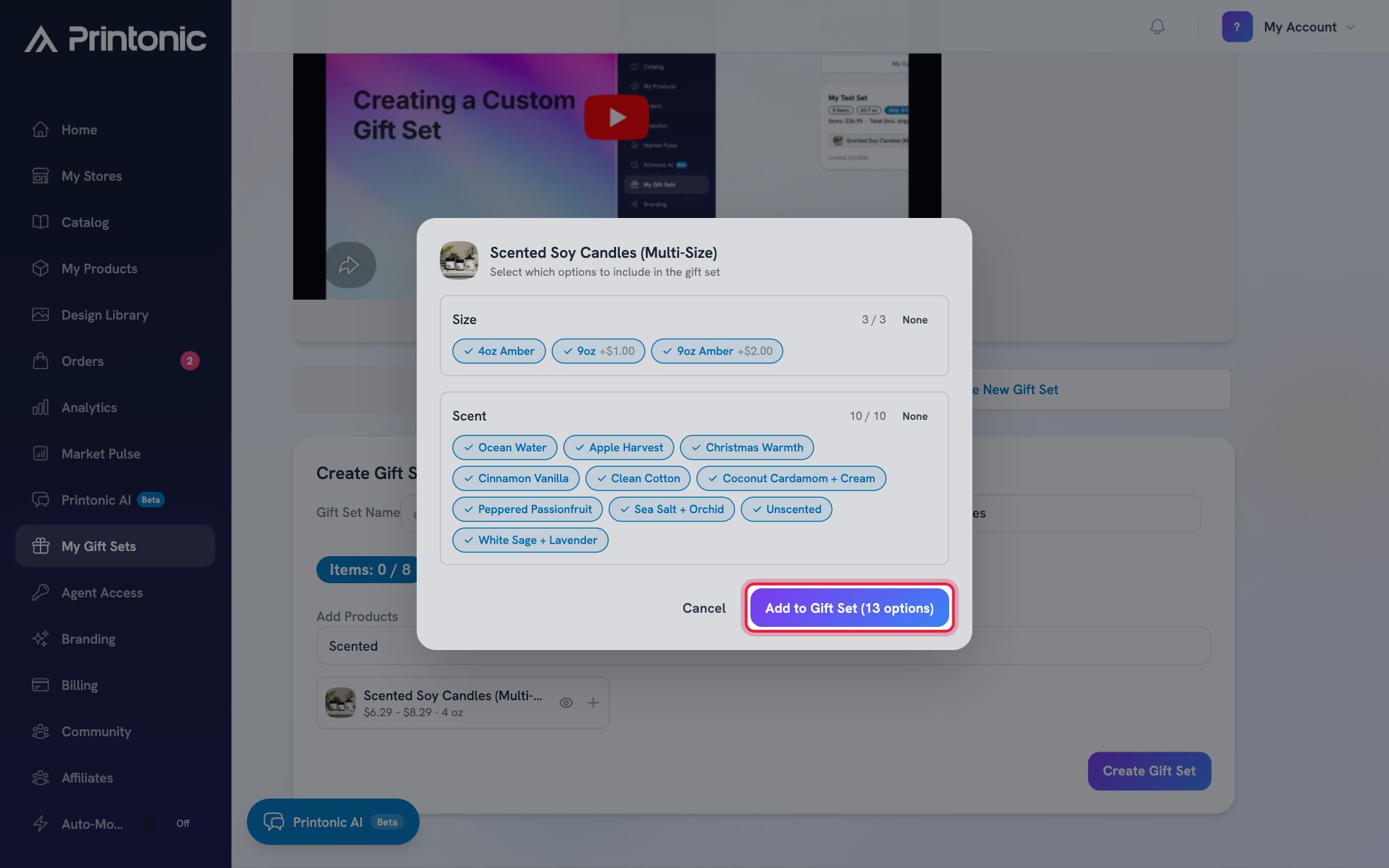
- 5
Dashboard > My Gift Sets > Create New Gift Set
Set your prices and review variations and mockups
In Bundle Contents & Pricing, adjust each item's quantity and enter Your Price (what the buyer pays for that item within the set) next to the Base Cost Printonic charges you. Below that, the Variations section shows which buyer choices the set will offer, and Mockup Templates lets you choose which product images to generate. The Cost Summary at the bottom shows products, shipping, weight, and the total.
A set can offer a limited number of buyer choices (the Variations badge shows your count, for example 1/2 selected). If two products have similar option lists, you can select exactly 2 variations and merge them into one choice.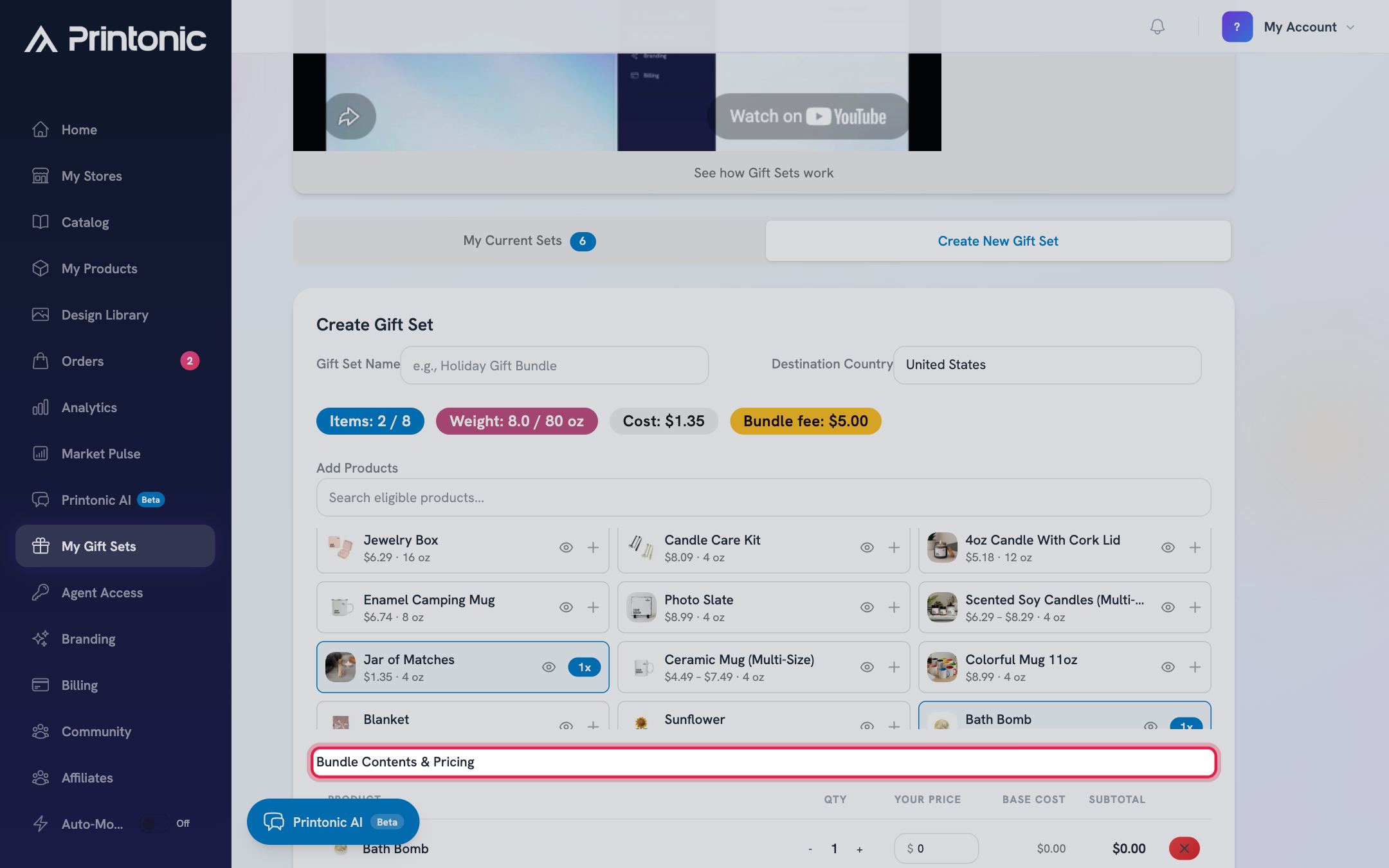
- 6
Dashboard > My Gift Sets > Create New Gift Set
Click Create Gift Set
Click Create Gift Set at the bottom. You will see the message: Gift set created! You can now set it up for listing. The page switches to the My Current Sets tab, where your set appears as a card with its item count, weight, shipping estimate, base cost, and total.
The set is a reusable template at this point, not a listing yet. Nothing is on your store until you finish the next steps.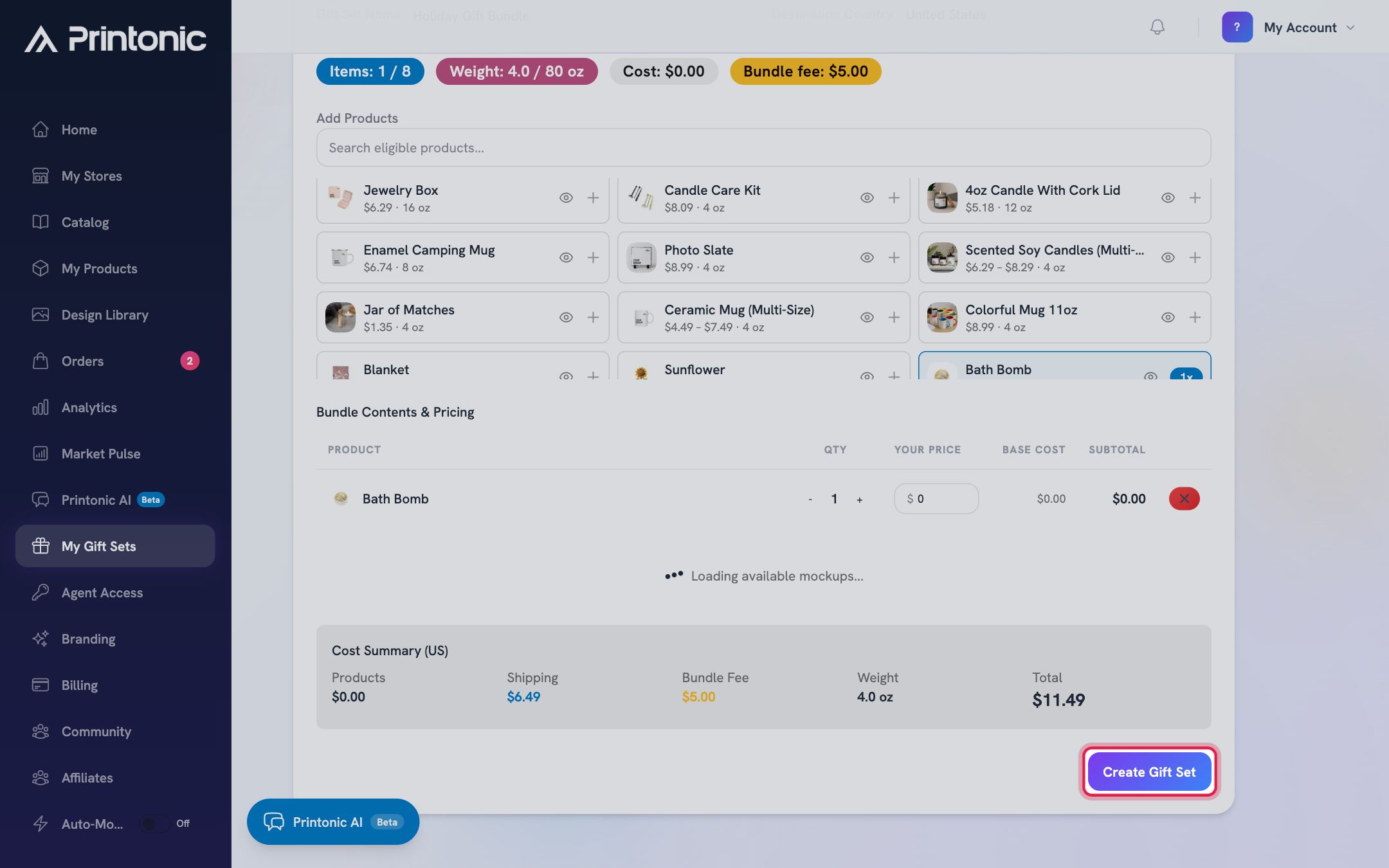
- 7
Dashboard > My Gift Sets > My Current Sets
Create the listing draft
On your set's card, click New Listing. A small form appears: the listing will use I made it and Made to order (pre-filled), and the Etsy category defaults to Spa Kits and Gift Sets (you can search for a different one). Click Create Listing Draft. Printonic builds the sellable product and opens its product page.
Everything TikTok Shop needs is handled automatically: the set is marked eligible to publish, the shipping weight is the full bundle weight, and the package dimensions are set to the standard gift box (10 x 8 x 4 inches). You never enter those yourself.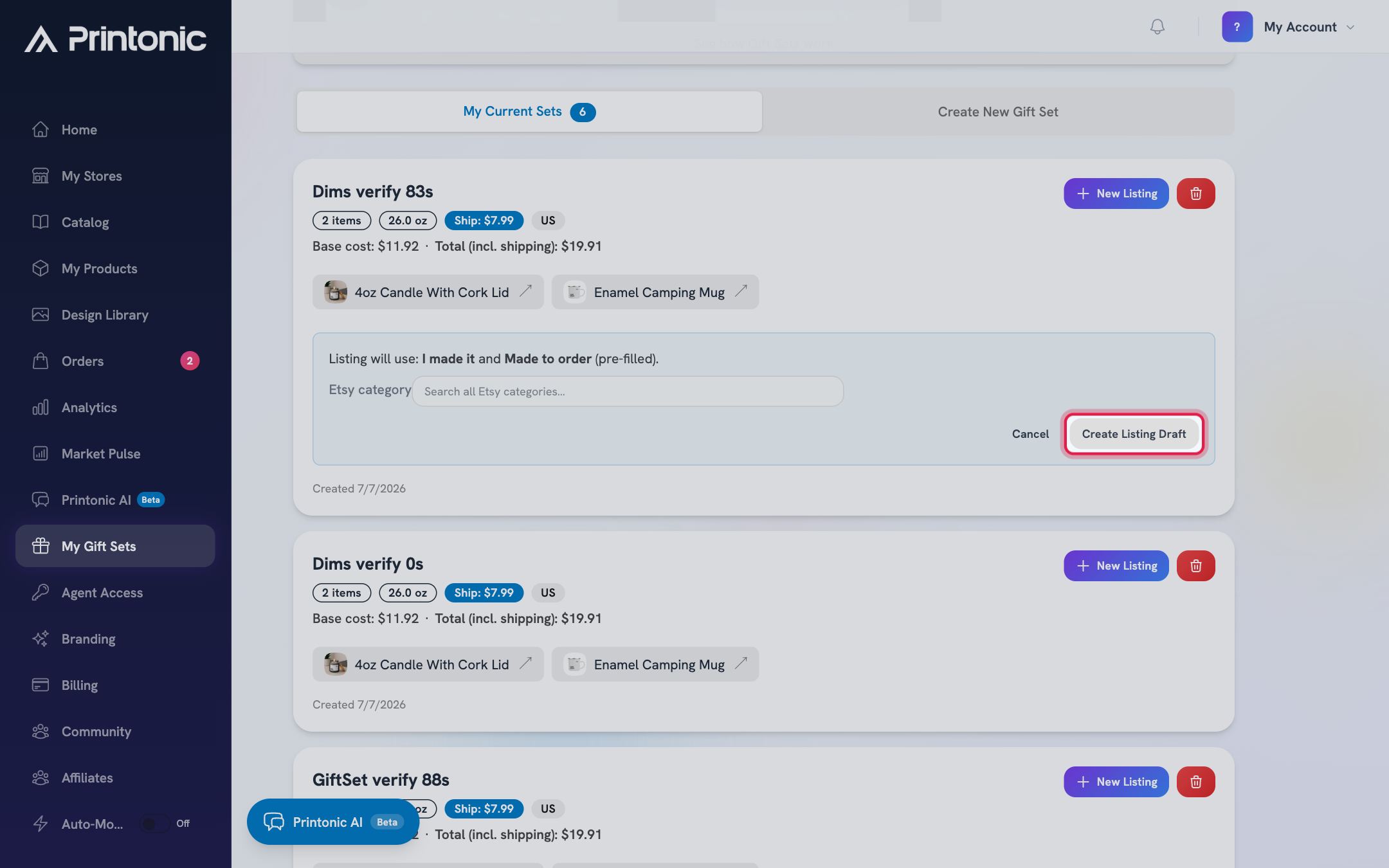
- 8
Product setup > Listing
Finish the Listing step and publish
On the product page, go to the Listing step. Pick which connected store the listing belongs to (TikTok Shop or Etsy), write your Listing Title and Listing Description, and set your price. Then click Publish to send the listing live to your store.
If your set offers a buyer choice (like multiple scents or colors), TikTok needs a one-time option mapping set up by the Printonic team before the first publish. If publishing to TikTok reports a mapping issue, contact support; once mapped, that set publishes normally from then on.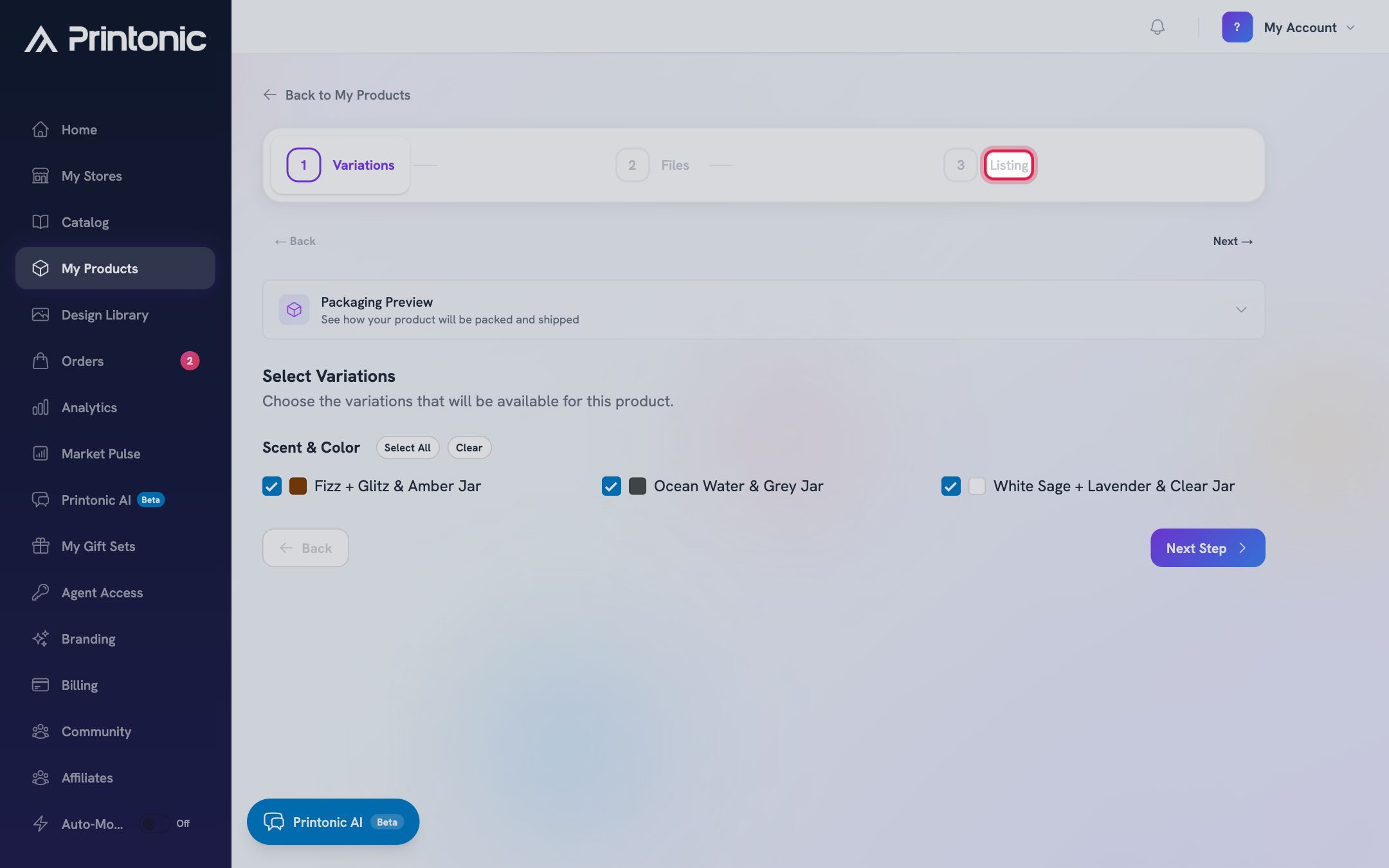
- 9
Dashboard > My Products > your set > Listing step
Check the set preview before you publish
Above the publish checklist, the set preview shows the best rendered image of the assembled set and one chip per item. A chip reads Shown when that item appears in a rendered mockup, Rendering while a mockup is still in progress, and Not shown when none of your selected mockups include it. The publish checklist repeats the result as a Set preview row.
If an item is Not shown, click Choose mockups to go back to the builder and pick a mockup that includes it, then let the render finish before you publish. Buyers only see what the mockups show. - 10
Dashboard > My Gift Sets > Edit
Edit a set and decide what happens to its listings
Every save of an existing set creates a new version, and the card shows the version number. Listings you created earlier keep shipping the contents they were built from, so each listing row tells you which version it was built from and whether an update is available. When your change keeps the same buyer choices, click Update listing to apply the new contents to that listing in place; the listing and its SKUs stay the same. When your change alters the choices buyers pick from, the card offers Create new listing instead, because the marketplace variations would change.
After an in-place update, orders that are still unpaid are listed with an Apply to these orders button. Paid orders are never changed; use Request a change on the order page for those. - 11
Dashboard > Orders
Sell it and let Printonic handle the rest
When the set sells, the order arrives in your Orders page already matched to your gift set. Printonic gathers the items, assembles the bundle in the gift box, and ships it as one package. Tracking is posted back to your store automatically.
You do not need to do anything special for gift set orders. They flow through the same Orders page as your single products.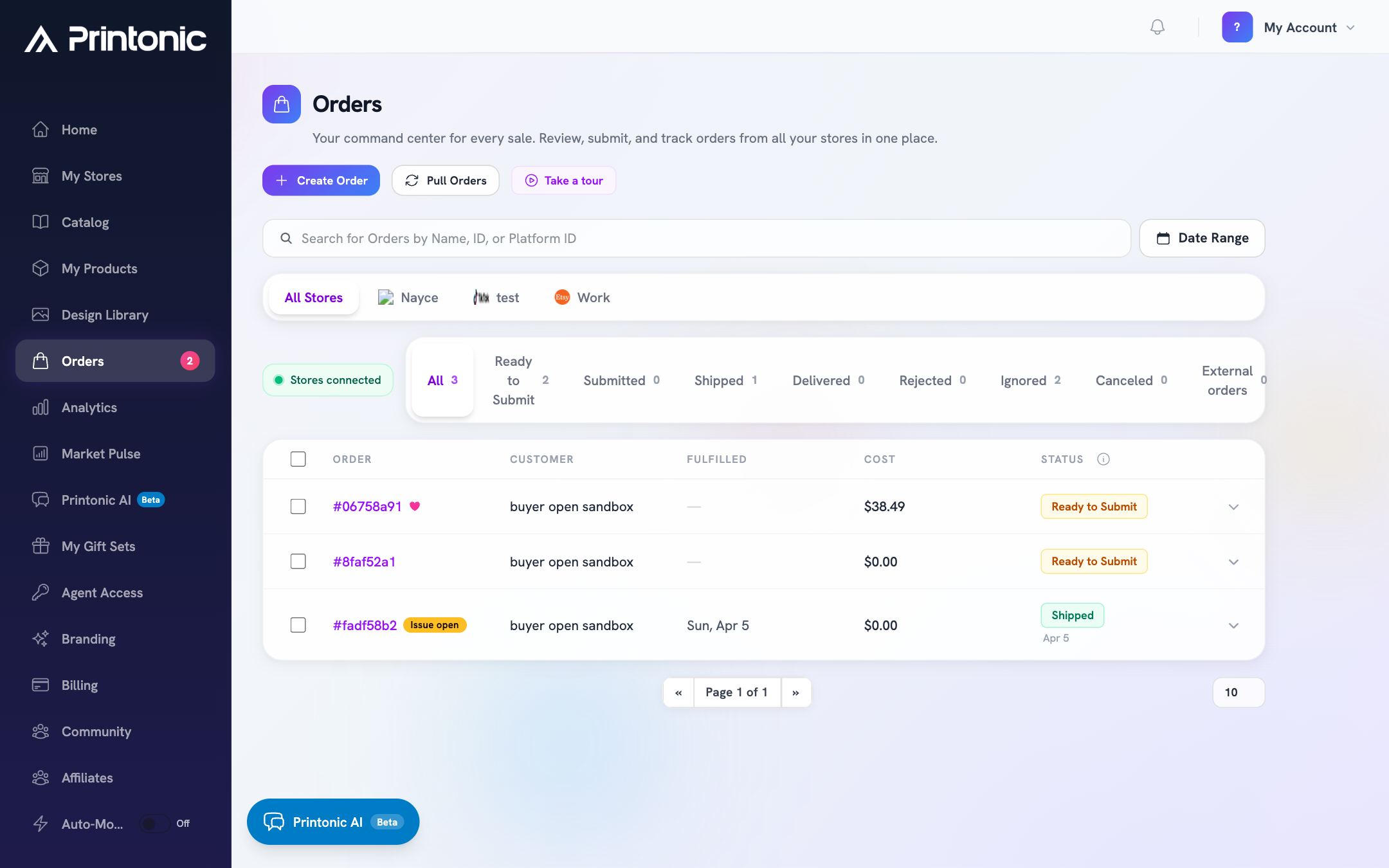
Good to know
- The shipping estimate accounts for the gift box and protective filling, not just the items, so it can be a little higher than the items' weights alone suggest.
- Base costs shown in the builder already include your Pro member discount on product price, so what you see is what Printonic charges when the set sells.
- You may see a Bundle fee badge in the builder. That is Printonic's assembly fee for packing the set, and it is included in the Cost Summary total.
- Before you publish, look at the Set preview on the Listing step. If an item says Not shown, buyers will not see it in your photos even though it ships in the box.
- Want the same set on both TikTok Shop and Etsy? Go back to My Current Sets and click New Listing again; each click creates a fresh draft you can publish to a different store.
Common questions
How do I sell one of the gift sets Printonic already put together?
Through the Catalog, not the builder, and with no subscription needed. Open Dashboard > Catalog, click the set you want, and press Add to My Products. That drops you into the same setup wizard as any product: pick the options you want to offer, then upload your art on the Files step, where a set has one tab per item in the box named after that item. Generate mockups if you want listing photos, then fill in the Listing step (store, title, description, price, tags) and click Publish.
Do I need a subscription to use gift sets?
Only to build your own. The Custom Gift Set Builder under My Gift Sets is a Printonic Pro feature, and if you are not subscribed that page shows an upgrade prompt (with a free trial where eligible). Listing a ready-made set from the Catalog is open to every seller.
Can buyers choose a scent or color inside the set?
Yes. Keep the variation selected in the builder and the published listing will offer that choice, up to the set's variation limit. For TikTok Shop, sets with a choice need a one-time option mapping by the Printonic team before the first publish.
Who packs and ships gift set orders?
Printonic does. We assemble the items into a gift-ready box (the standard box is 10 x 8 x 4 inches), ship it as a single package, and post the tracking number back to your store.
Can I edit a gift set after creating it?
Yes. Click Edit on the card. Each save creates a new version of the set. Listings you created earlier keep their old contents until you click Update listing on that listing row, or Create new listing when the buyer choices changed. Duplicate opens a copy in the builder if you would rather keep the original as it is.
My set has three kinds of choices. Why can I only expose two?
Etsy allows two variation dropdowns per listing. Combine two dimensions into one dropdown in the builder, or use Split into separate listings to pin one dimension and create one set per option. Each resulting set gets its own listing.
Related guides
Add a product
Turn a catalog item into your own product: pick variations, upload your art, set prices, and publish it to your store with the step-by-step setup wizard.
Manage your orders
Every order from every connected store lands in one Orders tab. Learn what each status means, how to sync, and how to send, ignore, restore, or resubmit orders in bulk.
Connect your store
Link your Etsy, Shopify, TikTok Shop, or WooCommerce store to Printonic so your orders sync automatically. Covers connecting, renaming, testing, disconnecting, and reconnecting.